
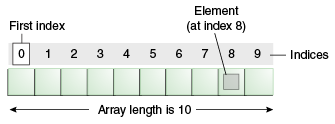
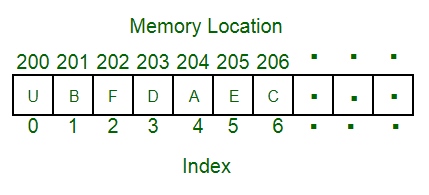
An array is collection of items stored at contiguous memory locations. The idea is to store multiple items of same type together. you can access the values in the array by referring to an index number.
Python does not have built-in support for Arrays, but Python Lists can be used instead however, to work with arrays in Python you will have to import a library, like the NumPy library.
In the below image we can see each element can be uniquely identified by their index in the array.
In Python we use zero-based indexing (The first element of the array is indexed by subscript of 0).
Advantages of using arrays:
Arrays allow random access of elements. This makes accessing elements by position faster.
Arrays have better cache locality that can make a pretty big difference in performance.
Array Methods
| Method | Description |
|---|---|
| append() | Adds an element at the end of the list |
| clear() | Removes all the elements from the list |
| copy() | Returns a copy of the list |
| count() | Returns the number of elements with the specified value |
| extend() | Add the elements of a list (or any iterable), to the end of the current list |
| index() | Returns the index of the first element with the specified value |
| insert() | Adds an element at the specified position |
| pop() | Removes the element at the specified position |
| remove() | Removes the first item with the specified value |
| reverse() | Reverses the order of the list |
| sort() | Sorts the list |
Array Implementation
Although arrays are pre-defined in Python in the form of lists, we can implement our own arrays.
Here, we will implement our own array with some common methods such as access, push, pop, insert, delete
# Python program to implement stooge sort

class my_array():
    def __init__(self):
        self.length = 0
#We initialize the array's length to be zero
        self.data = {}
#We initialize the data of the array using an empty dictionary. The keys will correspond to the index and the values to the data
#The attributes of the array class are stored in a dictionary by default.
#When the __dict__ method is called on an instance of the class it returns the attributes of the class along with their values in a dictionary format
#Now, when the instance of the class is printed, it returns a class object with its location in memory.
#But we know when we print the array we get the elements of the array as output
#When we print the instance of the class, the built-in __str__ method is called. So we can modify the __str__ method inside the class
#To suit our needs.
    def __str__(self):
       return str(self.__dict__)
#This will print the attributes of the array class(length and data) in string format when print(array_instance) is executed

    def get(self, index):
        return self.data[index]
#This method takes in the index of the element as a parameter and returns the corresponding element in O(1) time.

    def push(self, item):
        self.length += 1
        self.data[self.length - 1] = item
#Adds the item provided to the end of the array

    def pop(self):
        last_item = self.data[self.length-1]
#Collects the last element
        del self.data[self.length - 1]
#Deletes the last element from the array
        self.length -= 1
#Decrements the length attribute of the array by 1
        return last_item
#Returns the popped element. O(1) time

    def insert(self, index, item):
        self.length += 1
        for i in range(self.length-1, index, -1):
            self.data[i] = self.data[i-1]
#Shifts every element from the index to the end by one place towards right. Thus making space at the specified index
        self.data[index] = item
#Adds the element at the given index. O(n) operation


    def delete(self,index):
        for i in range(index, self.length-1):
            self.data[i] = self.data[i+1]
#Shifts elements from the given index to the end by one place towards left
        del self.data[self.length - 1]
#The last element which remains two times in the array is deleted
        self.length -= 1
#The length is decremented by 1. O(n) operation


arr = my_array()
arr.push(6)
#{'length': 1, 'data': {0: 6}}

arr.push(2)
#{'length': 2, 'data': {0: 6, 1: 2}}

arr.push(9)
#{'length': 3, 'data': {0: 6, 1: 2, 2: 9}}

arr.pop()
#{'length': 2, 'data': {0: 6, 1: 2}}

arr.push(45)
arr.push(12)
arr.push(67)
#{'length': 5, 'data': {0: 6, 1: 2, 2: 45, 3: 12, 4: 67}}

arr.insert(3,10)
#{'length': 6, 'data': {0: 6, 1: 2, 2: 45, 3: 10, 4: 12, 5: 67}}

arr.delete(4)
#{'length': 5, 'data': {0: 6, 1: 2, 2: 45, 3: 10, 4: 67}}

print(arr.get(1))
#2

print(arr)
#The outputs given after each function call are the outputs obtained by calling print(arr) and not by the function calls themselves
#{'length': 5, 'data': {0: 6, 1: 2, 2: 45, 3: 10, 4: 67}}
 Python, Data structures, OOPS, Big O